Use ERC-1155 tokens
Table of contents
- Previous steps: Install the FireFly CLI
- Create a stack with an ERC-1155 connector
- Use the Sandbox (optional)
- Create a pool
- Mint tokens
- Transfer tokens
- Sending data with a transfer
- Burn tokens
- Token approvals
Previous steps: Install the FireFly CLI
If you haven’t set up the FireFly CLI already, please go back to the Getting Started guide and read the section on how to Install the FireFly CLI.
Create a stack with an ERC-1155 connector
The default Token Connector that the FireFly CLI sets up is for ERC-20 and ERC-721. If you would like to work with ERC-1155 tokens, you need to create a stack that is configured to use that Token Connector. To do that, run:
ff init -t erc-1155
Then run:
ff start <your_stack_name>
Use the Sandbox (optional)
At this point you could open the Sandbox to http://localhost:3000/home?action=tokens.pools and perform the functions outlined in the rest of this guide. Or you can keep reading to learn how to build HTTP requests to work with tokens in FireFly.
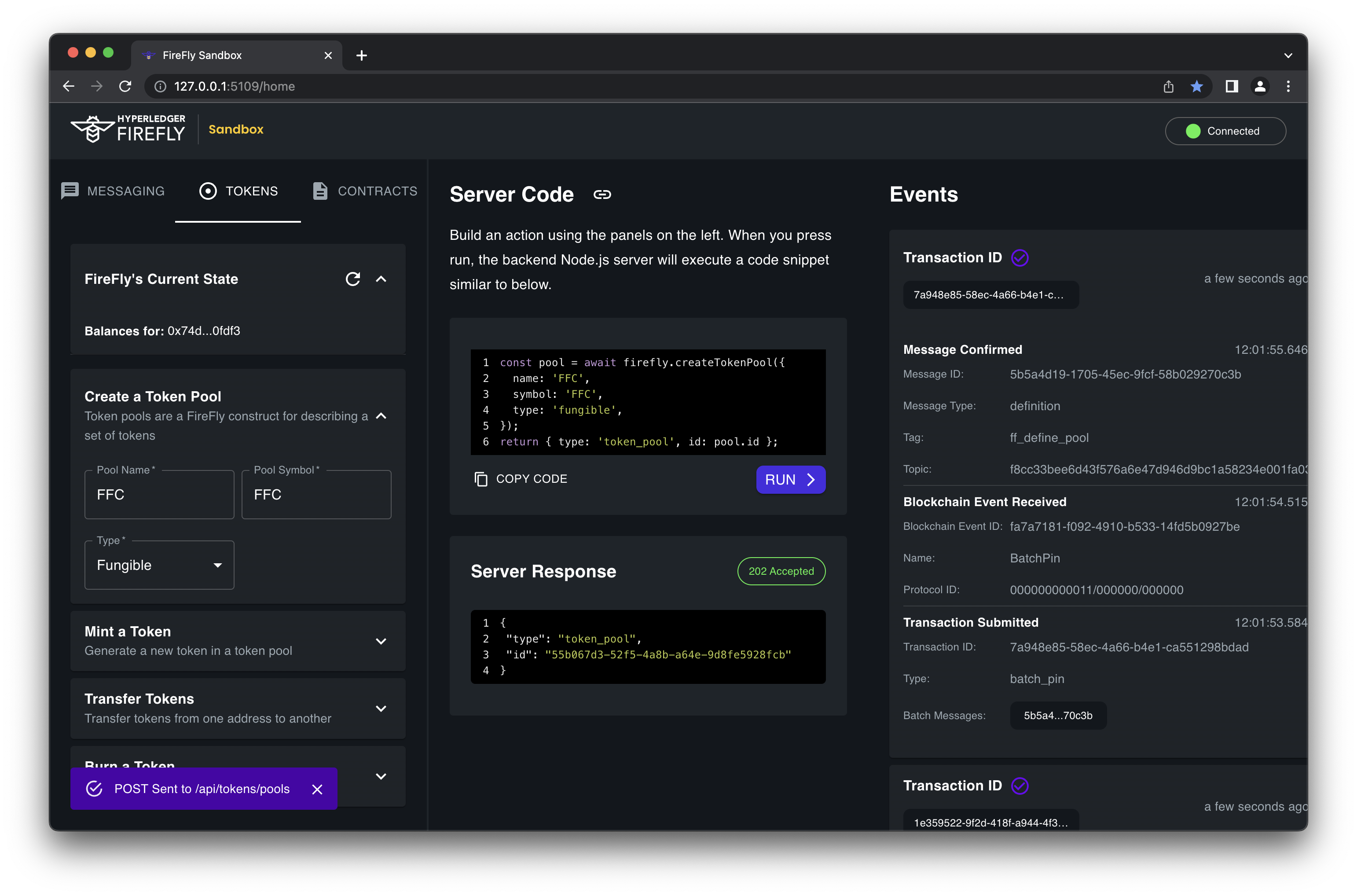
Create a pool
After you stack is up and running, the first thing you need to do is create a Token Pool. Every application will need at least one Token Pool. At a minimum, you must always
specify a name and type (fungible or nonfungible) for the pool.
POST http://127.0.0.1:5000/api/v1/namespaces/default/tokens/pools
{
  "name": "testpool",
  "type": "fungible"
}
Other parameters:
- You must specify a
connectorif you have configured multiple token connectors - You may pass through a
configobject of additional parameters, if supported by your token connector - You may specify a
keyunderstood by the connector (i.e. an Ethereum address) if you’d like to use a non-default signing identity
Mint tokens
Once you have a token pool, you can mint tokens within it. With the default firefly-tokens-erc1155 connector,
only the creator of a pool is allowed to mint - but each connector may define its own permission model.
POST http://127.0.0.1:5000/api/v1/namespaces/default/tokens/mint
{
  "amount": 10
}
Other parameters:
- You must specify a
poolname if you’ve created more than one pool - You may specify a
keyunderstood by the connector (i.e. an Ethereum address) if you’d like to use a non-default signing identity - You may specify
toif you’d like to send the minted tokens to a specific identity (default is the same askey)
Transfer tokens
You may transfer tokens within a pool by specifying an amount and a destination understood by the connector (i.e. an Ethereum address).
With the default firefly-tokens-erc1155 connector, only the owner of a token may transfer it away - but each connector may define its
own permission model.
POST http://127.0.0.1:5000/api/v1/namespaces/default/tokens/transfers
{
  "amount": 1,
  "to": "0x07eab7731db665caf02bc92c286f51dea81f923f"
}
NOTE: When transferring a non-fungible token, the amount must always be
1. ThetokenIndexfield is also required when transferring a non-fungible token.
Other parameters:
- You must specify a
poolname if you’ve created more than one pool - You may specify a
keyunderstood by the connector (i.e. an Ethereum address) if you’d like to use a non-default signing identity - You may specify
fromif you’d like to send tokens from a specific identity (default is the same askey)
Sending data with a transfer
All transfers (as well as mint/burn operations) support an optional message parameter that contains a broadcast or private
message to be sent along with the transfer. This message follows the same convention as other FireFly messages, and may be comprised
of text or blob data, and can provide context, metadata, or other supporting information about the transfer. The message will be
batched, hashed, and pinned to the primary blockchain.
The message ID and hash will also be sent to the token connector as part of the transfer operation, to be written to the token blockchain when the transaction is submitted. All recipients of the message will then be able to correlate the message with the token transfer.
POST http://127.0.0.1:5000/api/v1/namespaces/default/tokens/transfers
Broadcast message
{
  "amount": 1,
  "to": "0x07eab7731db665caf02bc92c286f51dea81f923f",
  "message": {
    "data": [{
      "value": "payment for goods"
    }]
  }
}
Private message
{
  "amount": 1,
  "to": "0x07eab7731db665caf02bc92c286f51dea81f923f",
  "message": {
    "header": {
      "type": "transfer_private",
    },
    "group": {
      "members": [{
          "identity": "org_1"
      }]
    },
    "data": [{
      "value": "payment for goods"
    }]
  }
}
Note that all parties in the network will be able to see the transfer (including the message ID and hash), but only the recipients of the message will be able to view the actual message data.
Burn tokens
You may burn tokens by simply specifying an amount. With the default firefly-tokens-erc1155 connector, only the owner of a token may
burn it - but each connector may define its own permission model.
POST http://127.0.0.1:5000/api/v1/namespaces/default/tokens/burn
{
  "amount": 1,
}
NOTE: When burning a non-fungible token, the amount must always be
1. ThetokenIndexfield is also required when burning a non-fungible token.
Other parameters:
- You must specify a
poolname if you’ve created more than one pool - You may specify a
keyunderstood by the connector (i.e. an Ethereum address) if you’d like to use a non-default signing identity - You may specify
fromif you’d like to burn tokens from a specific identity (default is the same askey)
Token approvals
You can also approve other wallets to transfer tokens on your behalf with the /approvals API. The important fields in a token approval API request are as follows:
approved: Sets whether another account is allowed to transfer tokens out of this wallet or not. If not specified, will default totrue. Setting tofalsecan revoke an existing approval.operator: The other account that is allowed to transfer tokens out of the wallet specified in thekeyfieldkey: The wallet address for the approval. If not set, it defaults to the address of the FireFly node submitting the transaction
Here is an example request that would let the signing account 0x634ee8c7d0894d086c7af1fc8514736aed251528 transfer any amount of tokens from my wallet
Request
POST http://127.0.0.1:5000/api/v1/namespaces/default/tokens/approvals
{
  "operator": "0x634ee8c7d0894d086c7af1fc8514736aed251528"
}
Response
{
    "localId": "46fef50a-cf93-4f92-acf8-fae161b37362",
    "pool": "e1477ed5-7282-48e5-ad9d-1612296bb29d",
    "connector": "erc1155",
    "key": "0x14ddd36a0c2f747130915bf5214061b1e4bec74c",
    "operator": "0x634ee8c7d0894d086c7af1fc8514736aed251528",
    "approved": true,
    "tx": {
        "type": "token_approval",
        "id": "00faa011-f42c-403d-a047-2df7318967cd"
    }
}